Showing posts with label Quick Fix. Show all posts

Saturday, October 1, 2011

How To: Remove/Disable WAT Update on Windows 7


If you don’t activate Windows 7 within 30 days after installation, you will not be able to use every feature of Windows. You can regain full use of your computer by activating Windows.

To activate Windows 7 LEGALLY on your computer, do the following:

Open Windows Activation by clicking the Start button, right-clicking Computer, clicking Properties, and then clicking Activate Windows now.‌ If you are prompted for an administrator password or confirmation, type the password or provide confirmation. If you want to activate it legally, just buy a original copy of Windows 7 to save your problem

BUT

If you want it to do the other way around so it won't cause you a lot of dollars, here is what you need to do! :)

This is the easiest solution for your problem of removing the WAT update in Windows 7. Just follow the instructions below.

INSTALLATION INSTRCUTIONS:

1. Download the WAT Remover here.

2. Run the crack as administrator. (In my case, it is already removed. I just show you how it looked like)
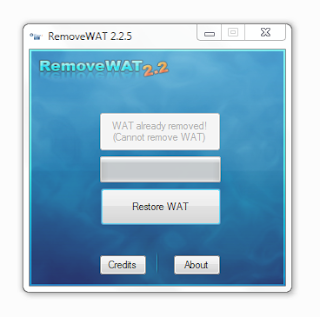
 3. Click on remove WAT.

4. After that a message will prompt that the system will be rebooting

5. Right Click the MyComputer icon on your computer and the WAT is now removed. See it for yourself!


Thursday, September 29, 2011

How To: Remove Windows Genuine Advantage (WGA) Notification


Windows Genuine Advantage (WGA) notifications pops-up when your computer did not passed the validation test. The validation test can be failed due to a (non-genuine) pirated copy of Windows XP. 


Sometimes you want your computer to be always up-to-date so you click the balloon on the bottom-right of your screen (the red shield-shape icon with an X on it) and change the Automatic Update settings to "Automatic (recommended)" which is wrong! You should turn off Automatic Update for it allows Windows to get updates from Mircrosoft and then the server detected that you have a pirated copy of Windows XP, so the balloon pops-up automatically every time you log on to your computer. You need to get rid of this problem as it can cause your computer to hang and shutdown randomly.


Okay here's what you need to do:

  •  Download Windows XP Crack here.
  •  Extract the .RAR file and Instal!
  •  Instructions are included in the folder (How To.txt)


Wednesday, September 28, 2011

How To: Disable Facebook New Chatbox


Facebook recently have some changes again, including in this change is the new Facebook's Chatbox which is very annoying! Liking pages like '999 million likes to get back the old FB chat' is useless, well I will teach you how to get back the old Facebook chatbox by installing some scripts. Don't worry, it's just a few clicks away!


You just need to install 'Sidebar Disabler' script on your browser, It only works if you are using Google Chrome, Mozilla Firefox and Opera. After you have installed the extension, restart your browser and enjoy using the old Facebook chat-box style!
      • Install 'Sidebar Disabler' for Chrome here
      • Install 'Sidebar Disabler' for Firefox here
      • Install 'Sidebar Disabler' for Opera here


Design by Free WordPress Themes | Bloggerized by Lasantha - Premium Blogger Themes | JCpenney Printable Coupons